More

Word Lens Magically Translates Words Before Your Eyes (VIDEO)

The Huffington Post    
First Posted: 12/17/10 04:07 AM ET Updated: 05/25/11 07:20 PM ET

You're in a foreign country. There's text in front of you - on a sign, in a menu, wherever - that you don't quite understand. What do you do?

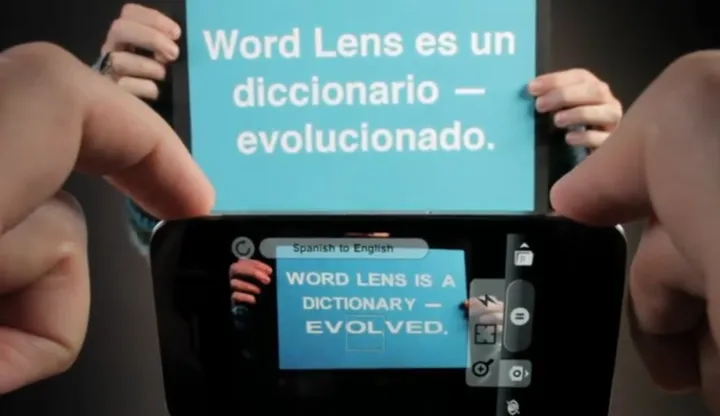
If you own an iPhone, you can just start up "Word Lens," a hot new app which translates words in front of you instantly. The app processes the words in image format and nearly immediately puts them in the language of your choice (the first version is just English-Spanish and Spanish-English, but there are more language offerings to come).

Word Lens is already getting rave reviews. TechCrunch quips, "This is what the future, literally, looks like." Reviewers in the Apple Store are widely praising it and YouTube commenters - sometimes a tough crowd - are noting how amazing it is. One YouTuber says, "Used to be science fiction!"

You have to see it to believe it.

WATCH:

FOLLOW HUFFPOST TECH

You're in a foreign country. There's text in front of you - on a sign, in a menu, wherever - that you don't quite understand. What do you do? If you own an iPhone, you can just start up "Word Lens,...
 
 
  • Comments
  • 145
  • Pending Comments
  • 0
  • View FAQ
Comments are closed for this entry
View All
Favorites
Recency  | 
Popularity
Page: 1 2 3 4 5  Next ›  Last »  (5 total)
11:52 AM on 12/20/2010
TransImage is another image translation application available for the iPhone. It’s a great, free option that has translations available in over 30 pre-installed languages. http://www.transperfect.com/marketing/iphone/transimage.html
09:30 PM on 12/19/2010
Hasn't this been around for a while?
06:41 AM on 12/20/2010
Yes indeed. Not for Apple but in Nokia Ovi store as Photo Translator.

Now it supports 17 languages for recognition and over 50 languages for translation.
04:29 PM on 12/18/2010
BFD - so does my kindle
photo
Morgantheaxe
Right is wrong, and left is correct!
10:28 AM on 12/21/2010
Ok, Ill explain the BFD for you so you can get over your smugness. The BFD is there are a LOT of folks out there that didn't know the capability was out there. The author wrote the story about a particular app he discovered and seemed to like. The author, nor I, nor anyone owes any promotion to your kindle. So, please get over it. Thanks for sharing the info on the kindle and have a great day.
This user has chosen to opt out of the Badges program
photo
stargazer13
To Love One Is To Love All
03:13 PM on 12/18/2010
yeah !! I want one !!

now if they could come up with a program that translates my posts in to proper English

for the peace & happiness of all the post pickers
photo
drjasonmd
Shalom, compa!
01:48 AM on 12/18/2010
Still waiting on the Babelfish.
photo
HUFFPOST SUPER USER
snorrk
Rational Survivalist
12:31 AM on 12/18/2010
Tie that to a text to speech app. Next will come speech recognition software > translation to speech, then a hand held universal translator from the Starship Enterprise...made in China (arrrrg...).
12:12 AM on 12/18/2010
On first order, I'd say that the real-time translation is working. I looked at the positions of the lady's fingers on the signs - they're consistent between the original and the translated signs.

However, they are using some tricks that the styling of the sign is trying to cover up:
1. All the signs are straight text on a high-contrast background.
2. The text and the background are a consistent color.
3. The text is all a sans-serif font.

This makes it easier for them, but if what they are doing is true then eventually complex backgrounds with serif fonts should be possible.
photo
HUFFPOST SUPER USER
ran6110
Mac, iPhone & iPad developer.
12:07 AM on 12/18/2010
Actually the app works pretty well, what they don't tell you is the basic 'free' app doesn't do any translation. You have to pay $4.99 for the Spanish to English and another $4.99 for the English to Spanish Dictionaries.

The 'demo' version that you download has 2 modes to show you they can identify words. One mode reverses the words and the other removes the words...

What's funny that they don't tell you is that if you have mixed language text it will get busy trying to translate English to English (or Spanish to Spanish) and many times it gets it wrong...
12:46 AM on 12/18/2010
20 years ago this would have been considered some sort of magic. Now we're complaining that it costs $4.99 and sometimes makes mistakes?

Reminds me of Louis CK's rant about "Everything is Amazing and Nobody's Happy" (Look it up for a good laugh.)
photo
HUFFPOST SUPER USER
ran6110
Mac, iPhone & iPad developer.
10:30 AM on 12/18/2010
Personally I am still amazed at the power that the new handheld devices have. The idea of identifying blocks of text, breaking them into words and translating them on the fly is astounding!

I don't know about everyone else, I personally bought both Dictionaries to use.

Some people may have a problem with downloading such a program and finding out they can't fully test is without a purchase.

I think a better demo would have included actually translating lets say every other word. But showing me you can find the words and reverse or hid them is just geek appeal and doesn't help the regular user evaluate the program.

Oh, and yes it's a very, very funny piece thanks for sharing!

Faved!
photo
HUFFPOST SUPER USER
cyberfringe
When the going gets weird, the weird turn pro.
11:15 PM on 12/17/2010
I need a translator for Chinese kanji (and the Japanese characters)! This is great. I saw a demo at Samsung in Seoul of something that looked like a ruler you could move over written Korean on a page to translate to English. This app seems so much better.
12:00 AM on 12/18/2010
The Google translator:
http://translate.google.com/

has been getting better. Test it out by doing English->Chinese->Japanese->English.
photo
HUFFPOST SUPER USER
Uggg
10:48 PM on 12/17/2010
So now I can go to the local Home Depot and know what aisle I need to go down to get something
07:55 PM on 12/17/2010
What a scam! So much for 24-year-old reporters who don't test apps before they write about them. Look at the street sign in Spanish and look at the one in English. No translation creates a totally new street sign!!!! And look at the buildings behind the street sign. This is the sorry state of reporting today. Write first and forget the facts - no retractions. Stand by your story! But where is this app demonstrated on an actual iPhone and we see the screen and both the English and the Spanish at once? How many people wasted $5 today?
HUFFPOST SUPER USER
crispee
08:17 PM on 12/17/2010
and i'm guessing you tested the app to support your rant?
08:23 PM on 12/17/2010
No - I just looked at the stills on various sites and the video - they are all different new signs. There is no translation. They just have English on one sign and Spanish on another totally different sign. That's a dead giveaway. Coupled with other comments here from people who bought it and it didn't work. The video is so cute. But when you look at it a second time, you realize there is no translation. They don't even try to show you how the app actually looks on an iPhone screen.
08:27 PM on 12/17/2010
Also when you go to the manufacturer's site - there is only one page - no contact info - no address - this is their only product - it just has their video on the page. It seems to have been launched solely on You Tube, Twitter and Facebook. It's just odd.
photo
jessepluna
Founder, buildyourfanbase.com
11:24 AM on 12/18/2010
When I first saw this I was super skeptical. I downloaded the app and the two translators (English-to-Spanish and Spanish-to-English) then tested it out and shot my own video of things.

This thing really works! I live in a very bilingual neighborhood so was able to try out both translation engines on city signs and a bus advertisement which was in Spanish.

I'd say the app is about 70% accurate on word translations and it even tries to match the sign fonts.

I don't want to be spammy and post a link her but you can check my Twitter timeline for the video and related blog post. ~@jesseluna
07:45 PM on 12/17/2010
Ummm....am I the only one who sees that these visuals are not translations but totally different signs? Where is the actual translation on an iPhone screen? There are none. Just stills and video of totally new signs - one in English and another one in Spanish. Did this writer even test this app on an iPhone? Why did the developer choose NOT to show us how the app works on an iPhone screen - but instead, created a fun video montage using totally different new signs. There's absolutely no translation in these visuals!!!
08:37 PM on 12/17/2010
You are the only one. it translates the text and rewrites on the same visual. also there not different there same ones its called augmented reality.

and it really does work I've tested it. still has some bugs though
09:09 PM on 12/17/2010
I am told that this cannot be augmented reality, which requires all sorts of sensors and high level computing, and, when demoed, is shown as a continuous stream so that no one thinks it is a trick. Myself - I don't yet know.
08:43 PM on 12/17/2010
if you have an iphone dowload it or don't. the demo is free on the app store by the way.

but don't disparage a product you don't understand.
08:47 PM on 12/17/2010
this is very interesting.....I will look into this!!
08:51 PM on 12/17/2010
but on second thought - whatever it is or isn't, don't you think the reporter - or a true tech reporter - should have then explained the technology, named the manufacturer instead of us having to look for them, told us of his test results - rather than simply posting it?
This user has chosen to opt out of the Badges program
07:44 PM on 12/17/2010
Tried it. Not ready yet. Works on about half the words (if that) and is not easy to use. Buggy/glitchy and pretty much just a well-marketed gimmick. Not worth five bucks.
photo
HUFFPOST SUPER USER
TrueBlue1112
07:19 PM on 12/17/2010
This is just INCREDIBLE!!
photo
HUFFPOST SUPER USER
janiepants
07:01 PM on 12/17/2010
wow. I have to get an iphone.