More

HuffPost Social Reading

Mozilla Password Reuse Visualizer Lets You See Which Passwords You Overuse

Mozilla Password Visualizer

The Huffington Post   First Posted: 02/21/2012 3:19 pm Updated: 02/21/2012 3:19 pm

Still using the same password across multiple websites? Mozilla has released a new tool just for people like you.

Mozilla hopes that the Firefox add-on "Password Reuse Visualizer," which visually maps your password use across the web, will encourage people to create securer and more unique passwords. Mozilla writes:

By looking at this visualization, you can get a quick idea of which passwords you've been using the most, and the kinds of sites you're using them on. As you continue to change your passwords and update your password manager, the picture will improve!

The add-on, which can be found here, creates a password web that shows you which passwords you've been using for which sites and warns you if multiple passwords are too similar to one another.
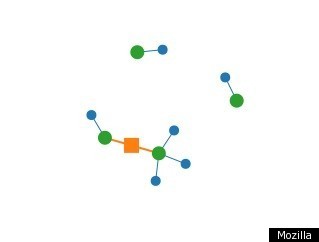
The green nodes represent the different passwords, the blue nodes are the sites you use them on, and the orange squares that may appear between password nodes mean that those passwords are in the same family. As Mozilla points out, an orange square doesn't necessarily mean the passwords need to be changed, since using variations on a similar password can be a good way to cut down on password overload without compromising security.

Gizmodo counters that passwords that are available for inclusion in the graphic have already been compromised. The visualizer can only access passwords that are saved on the browser, i.e. ones that you have asked websites to "remember."

"As soon as you save your passwords, it's game over," Gizmodo's Jamie Condliffe writes. "If someone steals your laptop, bad luck: those passwords can be recovered even if the thief can't log-in to your user account."

Want to see how easy it is to access a complete list of your saved passwords in Firefox? Simply go to Preferences --> Security --> Saved Passwords -- > Show Passwords and a dialogue box pops up that shows a list of usernames, passwords and the websites they are associated with.

On his Ask Leo blog, software and computer veteran Leo Notenboom suggests that internet users refrain from ever allowing websites to save login information. At the very least, he suggests Firefox users should create a master password so that their saved passwords will be encrypted. The master password option can be found under the Security tab in the Firefox preferences (though there are a few caveats to opting for a master password, which Notenboom outlines here).

Of course the first step in avoiding a cyber break-in is to create strong passwords to begin with. According to a Daily Finance post, good passwords are a combination of numbers, symbols and upper and lower-case letters and should be changed every six months no matter how tricky you think they are. And please don't make your password the word "password," which according to SplashData's November 2011 list of the 25 worst passwords, is the "secret" code that is easiest to hack. Check out the rest of the terrible 25 in our post here.

Related on HuffPost:

FOLLOW HUFFPOST TECH

Still using the same password across multiple websites? Mozilla has released a new tool just for people like you. Mozilla hopes that the Firefox add-on "Password Reuse Visualizer," which visually m...
 
 
  • Comments
  • 14
  • Pending Comments
  • 0
  • View FAQ
Post Comment Preview Comment
To reply to a Comment: Click "Reply" at the bottom of the comment; after being approved your comment will appear directly underneath the comment you replied to.
View All
Recency  | 
Popularity
HUFFPOST SUPER USER
euromarkusx
Political Party: Lobster
01:59 AM on 02/23/2012
What a stupid plugin
photo
Always For Real
Klaatu barada nikto
01:03 AM on 02/23/2012
A six month supply of Ginkgo Biloba might help some people remember their passwords.

Seriously though, secure and easy to remember passwords are not that difficult to create. Make up a memorable sentence for each site you use. For example:

My Huffington Post PassWord Leans 2 The Left (Mhppwl2tl)
Everytime I Login 2 Amazon I Spend 2 Much (Eili2ais2m)
How Will I Remember My Password 4 GMail (hwirmp4GM)

Stick in number or two and a Capital letter somewhere, a dash if it fits in. Keep it simple for YOU to remember and make it at least 8 characters long.

Also, don't keep a log of you passwords on you computer! If you must keep a log consider getting an encrypted thumb drive such as the Ironkey.

Cheers
06:40 PM on 02/22/2012
Or you can use something like 1password and forget the rest.
photo
HUFFPOST SUPER USER
psychmaj323
05:22 PM on 02/22/2012
Why would people save their password on firefox????
photo
PenguinLinux
got root ?
11:58 AM on 02/23/2012
Because some people have more than one computer and they want to synch between firefox on all PCs.
HUFFPOST SUPER USER
WilmaJune
09:18 AM on 02/22/2012
Please tell me why a special password is needed. I read the news. Sometimes make comments and play games. I do not buy anything online after a horrendous experience. It took 3 months to straighten it out. My choice is simple. Be paranoid or enjoy my computer.
photo
HUFFPOST SUPER USER
kkoie
07:30 AM on 02/22/2012
People who say we need to use more secure passwords are insane. I have my email passwords (2 of them), 5 passwords for work, passwords for insurance, investments, 3 credit cards, various websites.... if we don't use similar passwords we are stuck using pen & paper to keep track of the dozens of passwords. You tell me which is more secure
photo
PenguinLinux
got root ?
11:34 AM on 02/22/2012
"if we don't use similar passwords we are stuck using pen & paper to keep track of the dozens of passwords. You tell me which is more secure "

Since you asked........

1) Use case sensitive alpha-numeric passwords with symbols that are over 8 characters in length.

2) Use Firefox with the Secure Login and the Password Exporter extensions to manage them. Use the extension Xmarks with LastPass to synch them between all of your computers running Firefox so whenever you add/remove a bookmark, tab, password, it changes across the board.

3) Store all passwords in this encrypted database using a secure master password.

Windows: http://passwordsafe.sourceforge.net/

Linux: http://www.semanticgap.com/myps/
* Debian/Ubuntu/Linux Mint: sudo apt-get install mypasswordsafe
HUFFPOST SUPER USER
clearthinker16
reads, investigates and thinks before making stupi
01:34 AM on 02/22/2012
A good idea to not use the same passwords. Mine all have no relation to me or anything, just stuff that comes to my mind that I can remember
photo
HUFFPOST SUPER USER
ceez
Your micro-bio is empty
06:25 PM on 02/21/2012
i use Password1 for all my online activity! ;oP
05:38 PM on 02/21/2012
Oops...The TOOL IS a security breach...it bypasses the master password...this is NOT good...:(
05:31 PM on 02/21/2012
"Want to see how easy it is to access a complete list of your saved passwords in Firefox? Simply go to Preferences --> Security --> Saved Passwords -- > Show Passwords and a dialogue box pops up that shows a list of usernames, passwords and the websites they are associated with. "

Not if the user has installed a Master Password...then it just shows a list of usernames and websites
photo
HUFFPOST COMMUNITY MODERATOR
J0E1
Phil Hill 2012
04:52 PM on 02/21/2012
Never have your web browser save your password for you.  It's not even encrypted.  Leave your laptop alone for a few minutes and anyone can jump on and snap a picture of every username and password you have.  It literally takes 10 seconds to do.  This isn't just for identity thieves either.  Think about "friends of friends" who are over for a party or that new girl you just met but aren't quite sure of her mental health lol...
photo
HUFFPOST COMMUNITY MODERATOR
ManwithaParachute
Not Seeking Your Approval
07:13 PM on 02/21/2012
There is no foolproof security measure in computing unless one removes the computer and the human element from the equation.

It is a game with ever changing rules and players and everyone gets scored upon. The truth is that the very elite leave no traceable tracks. Those who get caught are simply not as good as they think. Some are criminal, some playful, most are juvenile and small amount are professional.