
iPhone app iPad app Android phone app Android tablet app More

The Worst Kinds Of Tweets: STUDY

The Huffington Post  |  By Posted: 04/18/2012 4:57 pm Updated: 04/18/2012 6:17 pm

Worst Tweets

With more than 140 million active users tweeting 340 million times per day as of March 2012, drawing in followers on Twitter with one well-crafted, 140 character-long tweet can be pretty difficult. While you may not have mastered the art of tweeting yet, the least you can do is avoid tweeting the wrong thing.

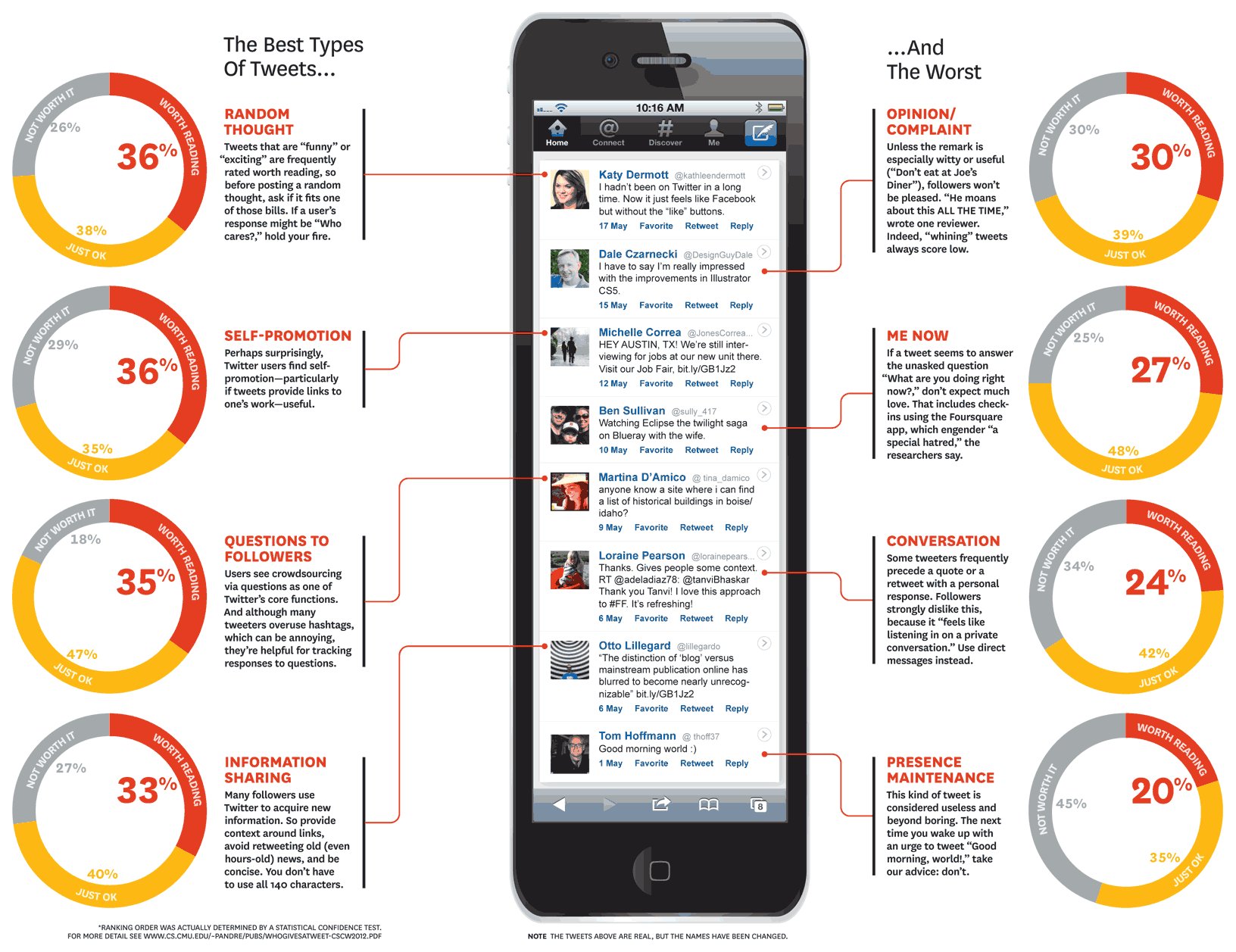
Thankfully, researchers at Carnegie Mellon University, Massachusetts Institute of Technology, and Georgia Institute of Technology have recently discovered just which kinds of tweets float and which inevitably sink. Using a website they created called Who Gives a Tweet?, researchers asked users to rate 10 different tweets as "Worth Reading," "OK," or "Not Worth Reading" in return for anonymous feedback on their own tweets.

They then analyzed 4,220 ratings sampled from a total of 43,738 tweet ratings submitted by 1,443 users and collected between December 2010 to January 2011. Their findings were presented at this year's Computer Supported Cooperative Work ACM conference in Seattle, Washington.

According to their results, Twitter users should stay away from sharing complaints, shallow opinions, or simple greetings like "Good morning!" In addition, tweets that are part of a personal conversation or simply explain what a user is doing at that current moment aren't very appreciated by followers.

Overall, the study showed that only 36% of tweets are worth reading, while 25% are not worth reading, and 39% are merely "okay." The researchers commented on the low percentage of tweets worth reading, writing, "Given that users actively choose to follow these accounts, it is striking that so few of the tweets are actively liked."

However, they also explained that this small sample might not necessarily be representative of the Twitterverse as a whole. Writes the Harvard Business Review, "The researchers caution that their raters tended to be technology-centric and news-focused (many learned about the study from sites such as TechCrunch and CNN.com), and may not be representative of Twitter users in general."

Check out the rest of the researchers' findings below, and then make sure to check out our slideshow of helpful Twitter tips you wanted to know but were afraid to ask (here). Are you guilty of sharing these kinds of tweets? What are your best tweeting tips? Let us know in the comments!

LOOK:
Also on HuffPost:

Flip through the slideshow (below) to view our list of Twitter tips for beginners.
  • Learn The Lingo

    The various Twitter shorthand--from DMs and RTs to #'s--can be puzzling to Twitter newbies. Here's the basic terminology you need to know: "RT" stands for "retweet," in which a user shares another tweeter's post, verbatim, while crediting the original tweeter. A retweet appears as "RT @[username]" followed by the tweet. A "DM" is a direct message--a message up to 140 characters in length that is sent only to another specific user, not to all of a user's Twitter followers. (A "DM fail" describes direct messages that were supposed to be private, but that were accidentally shared with all of a tweeter's followers.) A hashtag is created by using the # symbol ahead of a word or term. As Twitter explains, a hashtag "is used to mark keywords or topics in a Tweet. It was created organically by Twitter users as a way to categorize messages." Hashtags might be used to add color or personality to a tweet (like "#fail") or it could be used to tie a tweet to a specific, broader topic ("#Jan25"). Some use hashtags to track all tweets from a specific event (i.e. "#SXSW")

  • Tweet Pictures

    Want to share a snapshot of a concert? A screenshot? Or any other sort of media? Twitter enables you to share images (and videos) in tweets by embedding the media as links. One option is to use third-party image sharing services like Twitpic, Twitgoo, TweetPhoto, Yfrog, and Picktor, which allow you to upload photos or videos, then generate a link to the media (i.e. http://twitpic.com/31vyum) and will send a tweet to your account with that link. Users can also use these services, as well as others like Posterous and Mobypicture, to email or SMS photos and text, then have this information appear as tweets. Twitter's mobile apps, such as Twitter for iPhone and Twitter's Android app, also include photo sharing abilities, allowing users to embed links to photos in their tweets.

  • Use URL Shorteners And Track Your Stats

    Given Twitter's length limit, each character in a tweet is key. Rather than tweeting unwieldy URLs--which can run 120 characters in length--condense your URLs with a URL shortener before you tweet them. Services like bit.ly, goo.gl, and is.gd will "compress that address" (See the fastest URL shorteners here). URL shorteners will also display stats on how frequently and over what period of time your link has been clicked. To take advantage of this feature using bit.ly, for example, enter the shortened URL followed by a plus sign to check on the stats (i.e. "http://huff.to/fhlo5M+")

  • Hashtags: Use Them, But Don't Abuse Them

    Hashtags (such as "#SXSW" or "#Facebook") offer a way to "tag" tweets to a particular event, topic, trend, or location, or as a way of adding color or personality to a tweet. Hashtags can help your tweet get attention and traction--for example, some users might track all tweets from "#TED"--because, as Twitter explains, "if Tweet with a hashtag on a public account, anyone who does a search for that hashtag may find your Tweet." However, it's possible to include too many hashtags, which can turn some users off of retweeting (or even reading) a tweet. Three hashtags is generally the maximum number recommended per tweet.

  • Keep It Short

    Sometimes, you really do need all 140 characters to get your point across in a tweet. But other times, it's worth thinking about how you can keep your tweets a bit pithier, as there can be a downside to using all of your allotted characters: maxing out the 140 character limit makes it harder for other users to retweet your posts, as their retweet will add at several extra characters to the post--RT @yourtwittername. When you tweet, think about leaving som extra room (around 20 characters) to make your post more share-able. Alternately, if you are tweeting several 140 character posts in a row that are all part of a single thought o theme, alert your followers that the tweets are part of a series by including "1/3" or "2/3" in the tweet.

  • Twitter Lists

    It can be overwhelming at times to follow the firehose of tweets coming from the varied sources you follow, from friends to politicians, brands to pundits. Instead of having to absorb a wide range of tweets from the perhaps hundreds of tweeters you follow, users can use Twitter Lists to better organize the content that is shared and zero-in on a particular topic. Twitterers can create their own lists, or follow lists other people have created of tweeps tweeting about everything from Apple news to the unrest in Egypt. For example, for the latest tech news, you might follow HuffPostTech's "tech journalists" list, or tune in to TIME's "funny people" list for a laugh.

  • @ Replies

    Want to respond directly to someone's tweet? Start a conversation on Twitter with an "@ reply" directed at the tweeter you're replying to. To send an @ reply, start your tweet with "@username." For example, if @HuffPostTech posed a question on Twitter about people's first smartphones, a user could tweet back "@HuffPostTech my first phone was an iPhone." Note: @ replies will not be viewed by all of your followers. A tweet that begins @username is only visible to a subsection of tweeters. As Twitter explains, "People will only see others' replies in their home timeline if they are following both the sender and recipient of the update."

  • @ Mentions

    Let other Twitter users know you're tweeting to them or about them by including users' Twitter usernames in your tweets. For example, instead of saying "Going to dinner with my friend Bianca," you might tweet "Going to dinner with my friend @bbosker." Mentioning another account by its Twitter username can help that account gain followers--others can see that user's tweets and profile with just a click--and can also help you get other people's attention on Twitter. Many tweeters monitor their @ mentions to see what others are saying to them or about them, and in turn people use @ mentions to communicate with brands, media outlets, individuals, and other accounts. You can see your @mentions by clicking the "@mentions" tab on your homepage on Twitter.

  • Stay Organized With Third-Party Twitter Clients

    Rather than go to Twitter.com to track what's happening on Twitter, there are a host of third-party Twitter applications that can help you to better monitor--and tweet from--various accounts, as well as keep track of various social media platforms all in one place. Tweetdeck, Seesmic, and Hootsuite are just a few of the options.

FOLLOW TECH

From our partners


With more than 140 million active users tweeting 340 million times per day as of March 2012, drawing in followers on Twitter with one well-crafted, 140 character-long tweet can be pretty difficult. Wh...
 
 
  • Comments
  • 5
  • Pending Comments
  • 0
  • View FAQ
Post Comment Preview Comment
To reply to a Comment: Click "Reply" at the bottom of the comment; after being approved your comment will appear directly underneath the comment you replied to.
View All
Recency  | 
Popularity
photo
HUFFPOST SUPER USER
Ben Wilson
What's the story mourning Tories?
07:35 AM on 04/20/2012
Personally I can only manage 250 million tweets per day!
05:07 PM on 04/19/2012
I thought the whole porint of social media was shameless self-promotion...
HUFFPOST SUPER USER
Capn Scott
the 'moderated' me
01:20 AM on 04/19/2012
So you're saying that if a Twitter user tweeted, for instance, "just took a dump", then that would be among the 25% 'not worth reading'?

Unless, of course, the dump looked like Elvis or the Virgin Mary ...in which case it would be among the 36% 'worth reading'.

I get it now.
photo
HUFFPOST SUPER USER
bigshotprof
Pre-moderated for your protection
08:11 PM on 04/18/2012
@carnegiemellon bite me.
07:47 PM on 04/18/2012
Autoplay video? Do you realize how annoying that is? I just had to stop my music and search through my tabs before I could figure out where it was coming from. And then when I pressed "Pause" it didn't stop.

I don't even want to read the article anymore.