iPhone app iPad app Android phone app Android tablet app More

Pinterest Announces Attribution Tool Feature For Flickr, YouTube And More (PICTURES)

The Huffington Post  |  By Posted: 05/01/2012 6:35 pm Updated: 05/01/2012 6:35 pm

Pinterest Attribution

Pinterest's new tool makes sharing Flickr photos a snap. And it was designed with copyright holders in mind.

While Pinterest enjoys rapid growth and vast popularity, one of the biggest problems critics have found with the social bookmarking service is its tendency to indirectly promote copyright violation.

However, the arrival of a new attribution feature may help Pinterest make strides in fixing the issue.

According to a May 1 blog post, Pinterest has partnered up with photo management and sharing site Flickr to make it easier to pin photos from Flickr and credit the content's creator with an attribution statement included with each pin. Content pinned from sites like Behance, Vimeo and YouTube will also feature these attributions.

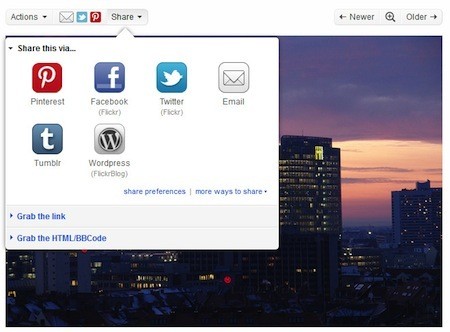
Photos enabled by a Flickr user for sharing on Pinterest will feature a Pinterest button in its share menu. For those who pin images from Flickr frequently, a Pin It button will appear as one of the two shortcuts on the photo's main page.

LOOK:
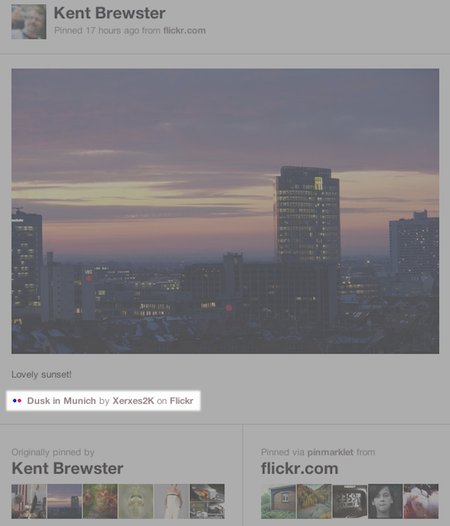
An unalterable attribution statement will appear below the pin's description along with a permanent link to the content, its creator, and where the content is hosted. Furthermore, the attribution will appear even if a photo is pinned from a third-party site where a Flickr image has been embedded.

LOOK:
According to The Next Web, social media statistics tool Zoomsphere found that in early March, Flickr was the seventh most popular source of content on Pinterest, even after Flickr put to use Pinterest's do-not-pin code on pages with copyrighted or protected images.

Later in March, Pinterest took a smaller step in righting copyright issues on the site by offering steamlined tools for reporting alleged copyright or trademark infringement, along with updating its Terms of Service, Acceptable Use Policy and Privacy Policy.

You can learn more about how these attribution statements work on Pinterest's website. What do you think about these new Pinterest attributions? Do you think they're a step in the right direction for Pinterest? Share your thoughts with us in the comments!

Also on HuffPost:

Want to pin like a pro? Take a look at our slideshow of handy Pinterest tools.
Loading Slideshow...
  • PinReach

    Much like <a href="https://www.facebook.com/help/?page=205260336179771" target="_hplink">Facebook Insights for Pages</a> and <a href="http://www.google.com/analytics/" target="_hplink">Google Analytics</a>, <a href="http://www.pinreach.com/" target="_hplink">PinReach</a> (formerly PinClout) is an analytics service that helps Pinterest users monitor trends and gauge their success on the site. To sign up, simply enter your Pinterest username, choose a PinReach username, and fill in your email and your desired password. Once you confirm your new log-in information through your email, you will be able to view how your PinReach score (similar to a <a href="http://klout.com/home" target="_hplink">Klout</a> score) or influence on Pinterest has changed over time. With this information, any user can figure out how to best increase user engagement on his Pinterest page and up his overall influence across the site. The website <a href="http://pinpuff.com/" target="_hplink">PinPuff</a> is a similar service that enables users to measure their influence, reach, and virality on Pinterest and will even assign a Pinfluence score and show the monetary value of a user's pins. [Hat Tip: <a href="http://thenextweb.com/socialmedia/2012/03/04/20-awesome-tools-which-will-have-you-pinteresting-like-a-pro/" target="_hplink">The Next Web</a>]

  • Pin A Quote

    Are you a Pinterest user who's a sucker for good quotes? <a href="http://pinaquote.com/#!prettyPhoto" target="_hplink">Pin A Quote</a> is a bookmarklet that will allow you to easily pin any text you want from the web. To get started, simply drag the "Pin A Quote" button featured on the tool's site to your browser's Bookmarks Toolbar. Then, find text on the web that you want to pin, highlight it, click on your toolbar's new "Pin A Quote" button, and fill in who said the quote. The tool will generate a pin of the text and automatically post it on Pinterest. Check out what your quote pin will look like in the screenshot above.

  • SpinPicks

    <a href="http://spinpicks.com/" target="_hplink">SpinPicks</a> is a website that lets users browse the web for interesting, Pinterest-worthy images and pin them directly to whichever Pinboard they please. Images are pulled from Flicker's Creative Commons database, Instagram, Twitpic, Reddit/R, YouTube, and PicPlz. SpinPicks also adds the ability to pin images directly to your Pinterest boards. The site is still in beta, but if you submit and confirm your email address, you can access it to try it out. All you have to do is choose a specific website like TwitPic or Insta-Popular under the "Category" option and "Spin" to find a randomly selected image from that site. An added bonus is that SpinPicks "doesn't pull spins from Google.com, Tumblr.com, Bing.com, and Facebook.com to help reduce the number of improperly attributed images, which helps ensure you're only adding quality pins to your Pinterest collection," according to <a href="http://spinpicks.com/" target="_hplink">the website</a>. Android users can pick up a free mobile app version of <a href="https://play.google.com/store/apps/details?id=com.spinpicks.mobile.free" target="_hplink">SpinPicks on Google Play</a>.

  • Pinerly

    In the same way that <a href="https://www.tumblr.com/" target="_hplink">Tumblr's Dashboard</a> allows for easy browsing and clear control of what's posted when, the website <a href="http://www.pinerly.com/i/u8o4A" target="_hplink">Pinerly</a> helps streamline Pinterest browsing and posting with its easy-to-use dashboard interface. <a href="http://agbeat.com/real-estate-technology-new-media/pinerly-dashboard-for-pinterest-stats-scheduled-pins-and-more/" target="_hplink">According to AGBeat</a>, after you sync your Pinterest account with the website, you'll be able "to locate other Pinterest users that are interested in the same topics, unfollow groups of pinners you no longer wish to follow, and keep your Pinterest stream focused," in addition to letting users schedule pins throughout the day and view how well their pinboards are doing with "Pin Stats." At present, Pinerly is not yet open to the public, but if you enter your email and share Pinerly's link via Facebook or Twitter, you may be able to get your invitation to join earlier than expected, along with some bonus features.

  • WiseStamp Pinterest Email App

    Email app-maker and platform <a href="http://apps.wisestamp.com/" target="_hplink">WiseStamp</a> is the developer behind the useful <a href="http://apps.wisestamp.com/emailapps/pinterest/" target="_hplink">Pinterest Email App</a>. The app places a "Follow Me On Pinterest" button at the bottom of emails as part of the sender's signature, which enables every email to become an encouragement for others to become followers on Pinterest. [Hat Tip: <a href="http://thenextweb.com/socialmedia/2012/03/04/20-awesome-tools-which-will-have-you-pinteresting-like-a-pro/" target="_hplink">The Next Web</a>]

  • Snapito!

    <a href="http://snapito.com/" target="_hplink">Snapito!</a> is a quick and simple way to get a full-page screenshot of whatever website you desire. It even has an option that allows you to pin a full or partial screenshot of the site straight to your Pinterest page. All you have to do is enter the website's address, wait for Snapito! to generate a screenshot, and choose "Pin to Pinterest" or "Pin Full Page" from the pull-down menu next to the "Snap!" button. Other helpful Pinterest screenshotting services include the Google Chrome extension <a href="https://chrome.google.com/webstore/detail/bblfnbhecjohdmmbokonmkbccafnapen" target="_hplink">Screen 2 Pin</a> and website <a href="http://url2pin.it/" target="_hplink">url2pin</a>. In addition, Chrome extension <a href="http://shotpin.com/" target="_hplink">ShotPin</a> allows for more selective screenshotting by letting you choose what part of a website you want to capture before pinning it to Pinterest.

  • Pinspiration

    Windows Phone users are in luck: <a href="http://www.windowsphone.com/en-us/apps/571ae8d6-5552-4597-8182-677748c62716" target="_hplink">Pinspiration</a> is a third-party app made especially for using Pinterest on Windows Phones. The app allows users to browse images and post them to Pinterest straight from their phones, just as they would on the web. iPhone users can also download the<a href="http://itunes.apple.com/us/app/pinterest/id429047995?mt=8" target="_hplink"> Pinterest iOS app</a>. Android users, keep your fingers crossed.

FOLLOW TECH

From our partners


Pinterest's new tool makes sharing Flickr photos a snap. And it was designed with copyright holders in mind. While Pinterest enjoys rapid growth and vast popularity, one of the biggest problems cr...
 
 
  • Comments
  • 7
  • Pending Comments
  • 0
  • View FAQ
Post Comment Preview Comment
To reply to a Comment: Click "Reply" at the bottom of the comment; after being approved your comment will appear directly underneath the comment you replied to.
View All
Favorites
Recency  | 
Popularity
This user has chosen to opt out of the Badges program
photo
12:59 PM on 06/22/2012
All pinners are doing is grabbing an image (which is actually just making a shortcut to another website) that they want to showoff (for whatever reasons). I do not know a single pinner that makes money or say the images are their own. AND most websites like that people pin from them, cause it is free advertisement for them.
It's just another social networking (though people really don't socialize, they pin , no talking) thing that some people can join because they don't get enough other social networking things to do for their fix.
I have a Pinterest account, but I don't have Twitter or Tumblr or the other hundreds of social networks out there. I like Pinterest because I use it as bookmarks to things around the internet that I would like to revisit and /or projects to do or dream about. No harm done.

I am happy Pinterest does not require I have other social networks to be able to sign in. Very soon, more and more websites will make you connect to them with Facebook or Twitter accounts. Those places I will not join, simple enough. I know it is a tech filled world, but I will only jump on the band wagons of my choice.
03:23 PM on 05/07/2012
Pinterest is great for social bookmarking, but what about personal bookmarking - the bookmarks for the sites you visit over and over? My company just launched http://iCrumz.com, a free cloud-based Internet bookmarking service. With iCrumz.com all your bookmarks are always available using any browser from any computer, mobile phone or tablet. The iCrumz interface allows you to have 100 or more bookmarks on a single webpage without being cluttered. iCrumz also offers an import function, so you can import and consolidate all your bookmarks from all your browsers on all your devices. Check out our short (1 minute) intro video: http://youtu.be/QDD23whIlrw Contact me if you have any questions. Also, we'd love to hear your feedback. Matthew[at]iCrumz[dot]com.
02:42 AM on 05/03/2012
I love Pinterest and glad that it will have more features :)
http://www.pinfaves.com
This user has chosen to opt out of the Badges program
photo
09:55 PM on 05/02/2012
first, as one who has slammed the author for not looking deeper into the wide problem of copyright infringement this article is a step in the right direction. however, it is still reporting from a press release rather than digging deeper. with that, pinterest still doesn't get it.

removal of transgression is not about attributing, it is about seeking permission first. i'll repeat that, seek permission first from the copyright holder.

with these new terms it still removes that important element. think disney would be happy just having a source qualifier? the answer is a defiant no. one must seek permission first. and that's what pinterest continues to skirt, and they still hide behind a safe harbor aspect of the dmca by stripping copyright data on intellectual property which owners of such must play "whack-mole" to remove all images pinned without permission.

the "only" way this site will work is by registering photographers who "want" their work pinned and allowing its members to reference/pin that work. until that happens it is still a site that pilfers intellectual property under the disguise of permissible use.
HUFFPOST SUPER USER
gemini68
11:09 AM on 05/02/2012
A step in the right direction. I like Pinterest but the copyright issue is a big one.
10:49 PM on 05/01/2012
FAIL

Attribution does not negate copyright infringement.
photo
HUFFPOST SUPER USER
mlabudaphotos
Photographer Toledo, Ohio
08:24 PM on 05/01/2012
Proper attributiuon on Pinterest has been a problem from the get-go. This is a step in the right direction. Now if the site engineers can have all works properly attributed, it will be a giant step forward. The reporting and tools were not and are not the problem. It has been attribution from the start. How can google images be a content creator that is cited, when google images is a search engine too.