iPhone app iPad app Android phone app Android tablet app More

iPhone vs. Android vs. Windows Phone: Which Smartphone Is Best For You? (iPhone Edition)

Posted: 05/08/2012 3:37 pm Updated: 05/08/2012 11:36 pm

For about five years now, the question for smartphone buyers has been a classic either/or: "Android or iPhone?" Answering that question is more difficult than ever, thanks to large advances in Android, as well as the emergence of a third viable option: Microsoft's beautiful Windows Phone OS.

This week, we'll attempt to break down your three options, looking at each operating system's greatest strengths and weaknesses. Which one you choose should depend largely on how you use your phone.

For the first part of this comparison, let's look at the iPhone and the iOS operating system. The most oft-repeated (and spot-on) description of the iPhone and its operating system is that Apple knows what you want and gives it to you and doesn't let you change it; you can't really alter or customize the experience because -- well, why would you want to?

Frankly, you would want to. There's a lot that's perfect about iOS, but there's also a lot it could learn from Android and Windows Phone. Here's where it sparkles over its competitors and where it could use work:

Strengths

Games And Apps: Apple doesn't just have the most apps in its app store; it also has the best apps. This is especially true for gaming: Gameplay on the iPhone is smoother than on any other smartphone I've tried.

Camera: The camera on the iPhone 4S trumps any other smartphone camera I've tried. The HTC One X comes close, but for high-quality photography day or night, the iPhone 4S is your best bet.

Easy To Use: The iPhone still has a simple interface that makes it a good buy for a first-time smartphone user. I think Windows Phone is a little easier to use -- the larger icons help, especially for older buyers with declining eyesight -- but the iPhone is still idiot-proof, from initial use, to navigating the phone, to the use of each individual app. The always-available Apple support team of Geniuses also helps.

iMessage: The iPhone is the most popular single smartphone in America, and with iMessage, texting any other iPhone is essentially free. Rather than counting against your monthly text message, any message sent over iMessage counts a minimal amount against your data plan.

Device Speed: Forget processors -- the iPhone is still, screen-to-screen, the fastest smartphone experience that is available. Apps and games load quickly and without stutter, and the touchscreen is always responsive to your touch, something that no Android phone can say quite yet. It's a satisfying experience and a big reason why the iPhone maintains its slick appearance.

Weaknesses

Maps/Navigation: We're still waiting on voice navigation -- spoken turn-by-turn directions -- on the Maps app on the iPhone. You can download other apps (for free) with Voice Navigation, but when you click on an address in an email or on a website to get directions, you'll be taken into Apple's Maps, not your GPS app of choice. Frustrating.

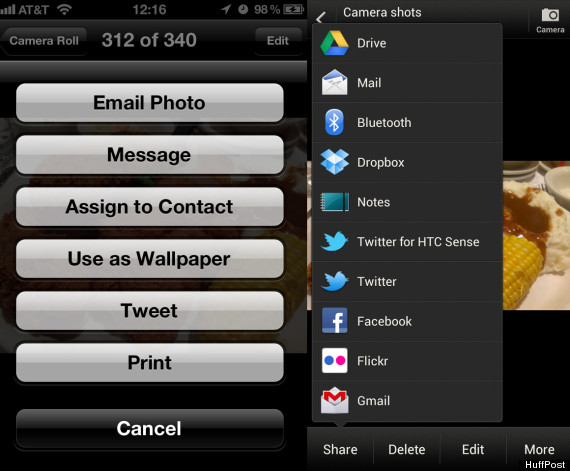
Facebook: Uploading photos to Facebook -- and Instagram, Google+, Dropbox and more, but let's focus on the world's largest social network -- is harder than it should be on the iPhone. When you take a photo on Android or Windows Phone, there is an option to upload it to Facebook and even tag your friends straight from the camera. On the iPhone, you have to go into the Facebook app and manually upload it. Apps just don't communicate with each other very well on the iPhone. For example, here is what I can do with a photo on the HTC One X versus what I can do with a photo on the iPhone 4S:
iphone android sharing
iPhone on the left, Android on the right. The list of apps you can share with grows as you download more applications (like Tumblr, Google+, etc.).


Homescreen: The iPhone's homescreen, and your options for what can be shown on it, is the most rigid and limited of the three major operating systems. When you unlock your iPhone's screen, you're going to be looking at your static rows of icons and nothing else. On Android and Windows Phone, you have the option to have "widgets" or "live tiles," respectively, that can give you a preview of your new mail, the current weather, top headlines, Facebook and Twitter updates, etc, without having to open any individual app.

Mail: Email on the iPhone is disappointing. Email reliably arrives slower on my iPhone than it does on Android devices, and searching through your archives for old messages is harder on the iPhone.

3G: Word is that Verizon salespeople are now pushing prospective iPhone buyers over to 4G Android devices, because the iPhone 4S runs on the slower 3G network rather than the newer, faster 4G network. Some writers are upset about this, but they really shouldn't be: The fact is that, to a consumer who just wants a phone that can make calls, send text messages and surf the Internet, the difference between operating systems matters less than the difference between 3G and 4G speeds. According to a 2012 study from PCWorld, 3G smartphones' (like the iPhone 4S) data speeds were around 1.05 megabytes per second on the download. On Verizon's 4G LTE network, that number rose to 7.35 megabytes per second. It's a speed advantage that is tangible when you are surfing the web or downloading apps on your smartphone.

So Who Should Buy The iPhone?

Buying an iPhone 4S is like walking into a pizza shop and getting a slice of pepperoni pie. It's a safe choice that won't let you down, but if you start to think about it, you might end up wondering what else you might have gotten.

The iPhone 4S is easily the best smartphone option for those who spend a lot of time playing games on their phones or who download a lot of apps to fill out their phone's functions. For those who use their phone as their primary camera, the iPhone 4S is also the best choice. Given how easy it is to use, and Apple's famously accessible "Geniuses" at its retail stores, I would also recommend it for first-time smartphone buyers who don't feel comfortable or confident in their ability to navigate the system. If you anticipate having lots of questions or needing assistance, Apple's help desk is phenomenal.

For those using their smartphone as an email, text message, Internet-browsing-portal, I would hold off on buying the iPhone until it upgrades to 4G LTE (probably in October), especially if you live in a large city, where 4G coverage will arrive first. You just might feel awfully silly with a 3G phone two years from now, considering the booming speeds and multibillion dollar expansion in 4G LTE networks that the four major U.S. carriers are going through right now. If you're committed to iOS and the iPhone, wait five months to get a new phone.

Take a look at the slideshow to see some of the best photo apps (that aren't Instagram) for iPhone.
Loading Slideshow...
  • Hipstamatic

    The customizable Hipstamatic camera attempts to "bring back the look, feel, unpredictable beauty, and fun of plastic toy cameras of the past"; it gives you, iPhone photographer, the option to swap camera lenses and film and change up your flash settings, creating heavily-filtered photographs that look like Polaroids. A download of Hipstamatic costs $1.99 and comes with four lenses, three different kinds of film, and three different kinds of flash. You can also purchase in-app upgrade "HipstaPaks," which come with one lens, one film, and one flash for 99 cents apiece. Combining all of these effects makes for good, addictive fun. Hipstamatic also comes with the option to order "analog" versions of your prints online and have them delivered to your door. Hipstamatic isn't exactly the hippest, most underground photography app out there -- after millions and millions of downloads, it probably reached its mainstream apex when <a href="http://lens.blogs.nytimes.com/2010/11/21/finding-the-right-tool-to-tell-a-war-story/" target="_hplink">New York Times war photographer Damon Winter used the app</a> to illustrate a story about the war in Afghanistan -- but it is an excellent option for filter-heavy iPhone photography. <a href="http://itunes.apple.com/us/app/hipstamatic/id342115564?mt=8" target="_hplink">Hipstamatic is $1.99 on the iTunes Store</a>. <strong>CORRECTION</strong>: An earlier version of this article stated that the New York Times war photographer was James Estrin; it was actually Damon Winter.

  • Camera+

    One of <a href="http://www.time.com/time/specials/packages/0,28757,2044480,00.html" target="_hplink">Time Magazine's 50 Best iPhone Apps of 2011</a>, Camera+ is cleverly titled: It's your iPhone camera PLUS a lot of helpful professional photography features that Apple's standard camera just doesn't have. You can adjust focus and exposure with your fingers; choose scene modes like Beach, Sunset, Portrait, and Nighttime; add borders and Instagram-like filters; and line up your shots with on-screen grid lines. The app comes with an attractive and intuitive interface (see above) that makes controlling the results of your picture-taking easy; it also comes with a robust editing suite for post-shot polishing. If you take your iPhone photography seriously, Camera+ is a solid purchase. <a href="http://itunes.apple.com/us/app/camera+/id329670577?mt=8" target="_hplink">Camera+ is 99 cents in the iTunes Store</a>.

  • IncrediBooth

    A silly little camera app best enjoyed with friends, IncrediBooth replicates the experience of a photo booth at a carnival or video arcade. You point your camera toward yourself (and hopefully, your friends (and even more hopefully, wearing silly hats)) and IncrediBooth takes four photos, which it spits out onto a kind of digital photo strip. You can save any individual photo from the strip, or the strip itself, onto your iPhone. IncrediBooth, which is 99 cents, comes with four filters (provided by the aforementioned Hipstamatic). You can buy additional filters for 99 cents apiece. <a href="http://itunes.apple.com/us/app/incredibooth/id378754705?mt=8" target="_hplink">IncrediBooth is $0.99 in the iTunes Store</a>.

  • CameraSharp

    CameraSharp is a full-featured, fast-loading camera that is all about super-creative control: - There is Sound Shutter, which allows you to take photos of you and your friends by clapping or whistling (that's me whistling above, starting a two second self-timer); - Self-Timer, which you can set by spinning two fingers in a circle on the screen to set the length of time before the photo takes; - Separate Focus and Exposure locks, which you can drag around the image before you take a shot to get the right lighting; - Continuous Mode, for bursts of photos or time-lapse photos, with adjustable intervals between shots. - Big Button Mode, which allows you to touch anywhere on the screen to take a picture... ...and more. Oh, and one other thing: CameraSharp very proudly advertises that it does NOT connect to Facebook, as it is "all about taking the best photo." It does save to your camera roll, and you can email your results and all that -- just no Facebook. (In an age of frictionless connectivity, it is perhaps the first openly anti-Facebook app I've ever encountered.) <a href="http://itunes.apple.com/us/app/camerasharp-all-in-one-camera/id442142280?mt=8" target="_hplink">CameraSharp is $1.99 in the iTunes Store</a>

  • Fast Camera

    The other day, a proud new parent (and colleague) was complaining to me that he needed a smartphone whose camera could open super quickly and immediately be available to take photos, lest he miss his littlest one doing something adorable. Fast Camera could help: As soon as you open the app, Fast Camera begins taking 8-megapixel photos as fast as it can and doesn't stop until you press a button. (If you're wondering just how fast "Fast Camera" is: The developer claims it can take up to 800 photos <em>per minute</em>; it's pretty dang fast). It's not super customizable as a shooter, per se: You can choose rear camera or front, VGA or 8 megapixel; landscape or portrait; and you can also set the delay between pics, from "None" to 1/10 second to 1/5 second to 1/4 second and so on. There is also a self-timer, if you want to take a whole bunch of group shots at once and choose from the best. The main attraction, however, is the auto-starting burst of photos that you get whenever you open the app. With Fast Camera, you may never have to miss that fleeting, once-in-a-lifetime shot -- or first step. <a href="http://itunes.apple.com/us/app/fast-camera/id402777723?mt=8" target="_hplink">Fast Camera is $0.99 in the iTunes Store</a>.

  • GroupShot

    GroupShot advertises itself as "magic," and it really might be. You know how, during photo shoots with a large group of people, you sometimes get the <em>perfect</em> picture of everyone, except one person who's blinking or yawning or unexpectedly bleeding for some reason? GroupShot is insurance against this in the coolest way possible: You can simply look at all the photos you took of the group and add in whichever face you want, to create the group photo you want to keep. Here are the steps: 1. Take a bunch of group photos. 2. Rub your finger over the person's face you want to replace. 3. GroupShot shows the faces from other photos that it can stitch onto the original photos. 4. Choose the best face. 5. GroupShot performs some "magic" and integrates that face into your photo. You're done! In our tests, this worked flawlessly and was fun to show off around the office, too. Expect to see this technology --implemented like this, in the simplest way possible -- elsewhere in the near future. <a href="http://itunes.apple.com/us/app/groupshot/id488709126?mt=8" target="_hplink">GroupShot is available for $0.99 in the iTunes Store</a>.

  • CamWow

    Aside from reminding us of <a href="http://www.youtube.com/watch?v=QwRISkyV_B8" target="_hplink">one of the all-time greatest infomercials</a> (with Vince!), we like CamWow as a straight-up Instagram alternative for those photogs obsessed with filters. CamWow offers 20 free filters and effects, all of which you can see in real-time on a four-by-four grid of live cameras. You simply touch the filter you want to take a photo. It's a neat representation of the different options you have using a camera with multiple filters. The download is free, but you have to pay $1.99 to get rid of the ads and the CamWow watermark on your photos (if you so choose). <a href="http://itunes.apple.com/us/app/camwow-free-photo-booth-effects/id418368641?mt=8" target="_hplink">CamWow is free in the iTunes Store</a>.

  • Pro HDR

    A photographer friend assures me that this is "probably the best HDR app in the app store;" I have no reason to disagree. Pro HDR combines two photos -- one optimized for hightlights, one for shadows -- and merges the two together to create the best one. It also comes with a powerful (if ugly) editing suite, which now features 20 filters, 15 frames, and the option to add text to your photos. <a href="http://itunes.apple.com/us/app/pro-hdr/id347104281?mt=8" target="_hplink">Pro HDR is $1.99 in the iTunes Store</a>. You might also check out HDR FX, for an HDR camera with an emphasis on filters, <a href="http://itunes.apple.com/us/app/hdr-fx/id503560704?mt=8" target="_hplink">which is a free download until April 23, 2012</a>.

  • Gif Boom

    We all love Gifs, right? Those short, soundless, animated slices of hilarity that have dominated the Internet and <a href="http://whatshouldwecallme.tumblr.com/" target="_hplink">the way we represent our emotions and reactions</a> online? Now you can create your own, on the iPhone, for free! Gif Boom takes up to 20 photos in a row and stitches them together for you; you can add filters, colorful frames, and change the speed and direction of the gif in a simple post-production editing suite. Above, you can see a sample of Gif Boom's output (sorry for the nightmares). <a href="http://itunes.apple.com/us/app/gifboom-animated-gif-camera/id457502693?mt=8" target="_hplink">Gif Boom is available for free in the iTunes Store</a>.

  • Flixel

    Finally, Flixel is more of a curiosity than a must-have camera replacement. Like Gif Boom, Flixel's output is a Gif; like Gif Boom, Flixel allows you to animate your photos, taking quick shots in succession. Unlike Gif Boom, however, Flixel gives you a unique option: You can choose the portion of a photo you want to animate, leaving the surroundings static. See above, and my mouth. Flixel's new (you can <a href="http://www.fastcodesign.com/1669354/move-aside-hipstamatic-flixel-iphone-app-turns-pics-into-artsy-animated-gifs" target="_hplink">read a good profile here</a> at Fast Co. Design), but it boasts a simple interface -- you just drag your finger over the area you want to animate and press "Done." It's fun, and easier to use than <a href="http://itunes.apple.com/us/app/cinemagram/id487225881?mt=8" target="_hplink">competitor Cinemagram</a>; unlike the $1.99 app Cinegram, it doesn't cost any money to try, which, you know, seems like a benefit. <a href="http://itunes.apple.com/app/flixel/id496885363?mt=8" target="_hplink">Flixel is free in the iTunes Store</a>.

  • ALSO ON THE HUFFINGTON POST

    Maryam Mehrtash shows us a couple apps that allow you edit your photos on your iPhone: Photo FX and Retro Camera. These apps let you edit your photos to give them any look and feel that you want.

FOLLOW TECH

From our partners


For about five years now, the question for smartphone buyers has been a classic either/or: "Android or iPhone?" Answering that question is more difficult than ever, thanks to large advances in Android...
 
 
  • Comments
  • 386
  • Pending Comments
  • 0
  • View FAQ
Post Comment Preview Comment
To reply to a Comment: Click "Reply" at the bottom of the comment; after being approved your comment will appear directly underneath the comment you replied to.
View All
Favorites
Recency  | 
Popularity
Page: 1 2 3 4 5  Next ›  Last »  (10 total)
02:50 AM on 07/03/2012
iPhone is the best no doubt.
06:42 PM on 06/18/2012
As you can read on Gnome Escape
the iPhone offers the best and most entertaining apps, as well as an ease of use that makes first time users fall in love instantly
11:36 AM on 05/29/2012
Discover the latest apps and games. FREE and enjoy instantly on your Android phone or tablet.

http://piratesystem.net
photo
HUFFPOST SUPER USER
Darius Molark
de gustibus non est disputandum
01:35 PM on 05/10/2012
3G and 4G should be what they say, three and four gigs downloaded per second. This misnomer is just like the price on the phones one pays. They are not $50, $100, $400, they are a contract lasting three years for $100 a month that cannot be broken. People eat up this corporate dishonesty so that it becomes definitive. It's wrong.

But feel good when Verizon finally relents on seven megs per second like it's a god sent. In the wings they have that one gig per second that's going to cost $500 a month as they prepare the willing crowd of minnows to agree to and justify the pricing.

The thing is that costs are being pressed down if one can read any signs of world economics, not up. That monthly price for the car that was once approaching the monthly figure for a mortgage, all these things are going down. With the adoption of fiber optics, look forward to a different business model on the pricing of bits and bytes. The present one is outlandish.
08:28 AM on 05/13/2012
3G means 3rd Generation, not 3 Gigs. Naming these protocols based on speed would be much more deceitful because the realized speeds are highly volatile. Furthermore, while it may have been 'evil' at the beginning, whining about how cell phone plans are structured and marketed is a bit much at this point.

So the technology exists for widespread use of 150x the speed and they continue to market and build out 4G...really? Seems like quite the conspiracy theory.

Costs do go down. Unlimited cell phone plans would be well over 100$/mth not long ago. The pricing model will surely change...eventually, but you seem to think that it hasn't changed and that it's about to bust.
photo
HUFFPOST SUPER USER
Darius Molark
de gustibus non est disputandum
11:31 AM on 05/13/2012
Thanks! I stand corrected.
photo
HUFFPOST SUPER USER
Darius Molark
de gustibus non est disputandum
11:53 AM on 05/14/2012
In the US we are enamored with such terns as 3G, 4G and LTE G. But our speeds are a pittance compared to other countries. Why?

4G is supposed to be the fastest, downloading 5 megabits to 20 megabits of data per second. 3G reaches up to 1 Mbps. Technicians don't determine the rubrics for speed. Pretty marketers do. LTE, a spin-off of something, supposedly downloads 6.5 Mbps to 26.3 Mbps. WiMax, based on microwave tech and considered futureless, goes from 1 to 5 Mbps. High-Speed Packet Access (HSPA+) for 3G goes for 1.9 Mb.

Most of these depend on billion dollar spectrum purchased by the carriers. More smartphone users will crowd out spectrum availability meaning higher charges.

But what's the truth? My internet connection .35 Mbps

Hong Kong 36.47 Mbps
Lithuania 33.90 Mbps
South Korea 28.05 Mbps
Singapore 27.92 Mbps
Germany 14.98 Mbps
Russia 13.97 Mbps
Canada 12.77 Mbps

United States 12.54 Mbps

France 12.09 Mbpos
Bolivia 0.80
http://netindex.com/download/allcountries/

April article considers Verizon "king of the hill" surpassing "download speeds of 3 Mbps at least 70 percent of the time in 36 of the 42 markets studied. AT&T, by comparison, hit that milestone in just 18 markets."

Shouldn’t we have faster speeds? What’s the solution? More cooperative (or) collusion among the carriers? Is the market working? More competitive fiber optical cable?
09:54 AM on 05/10/2012
This is such a Fanboy article...But mostly true on who should buy which...
08:59 AM on 05/10/2012
I have a jailbroken iPhone 4. Siri works well. I boosted my camera pixels to 4S. And I have "tweaks" that 4S users would be jealous of.
Nah...iPhone that is jailbroke? Blows all smartphones away! I'd never give up my iPhone.
08:46 AM on 05/10/2012
lol pointing out camera and graphics smoothness... lots of apps which are 3 times more expensive than in android market, limited to itunes, you cant even register without entering your credit card number, you cant just copy music into folder and listen to it, you have to do through specific computer... and moreover if you need a phone for calling texting and writing emails, why not to mention androids ability to briliantly sync all the contacts, with your google account. and oh, list expands e.g. flash player.. it will take time to get all the websites to switch to html5 and till then you will just hope that sites you are visiting will support iphone.
very pointless review, seems like when you were writing it, you were looking at iphone commercial and admitting all the things apple states in it.
To my opinion iPhone has more smooth interface. But usability of a phone for other purposes than gaming is worse or equal. And the disadvantages of iPhone, maybe is only few things, like itunes, flash player and google products(calendar, contacts, docs, email). But those three things can give you really big pain. To those who say that there's workaround - workarounds cannot be elements of perfectly designed system
HUFFPOST SUPER USER
malexandria
10:33 PM on 05/09/2012
You also didn't mention the horrible call and sound quality on the iPhone 4. I have one and as a PHONE it is the worst phone I've ever used. I love it for everything else it does, but as a PHONE it is terrible. I've dealt with it because I don't make that many calls.

If I ever have to do anything that requires using data while out in about, it is painfully slow and barely useable on AT&T 3G. For all of these reasons, if Apple doesn't come out with the iPhone 5 in June, I'm switching to an Android 4G Phone and maybe get the next iPod Touch for my car.
HUFFPOST SUPER USER
malexandria
10:28 PM on 05/09/2012
What the Heck, I thought this article was about Android or at least a REAL comparison between all three systems. This is nothing more than iPhone propaganda disguised as a "balanced" review.
HUFFPOST SUPER USER
HeliosOne
07:19 PM on 05/09/2012
I have had all three and hands-down I love my iPhone the most! I do agree with the complaint that you have to go into the Facebook app to upload a photo. It's really annoying, but considering how many Android phones that I've had that barely function (Samsung Transform), I can deal with it.
02:48 PM on 06/12/2012
I have a Samsung Transform and it is one of the smoothest working phones I have ever owned. It even got left in the rain and still works fine.
HUFFPOST SUPER USER
HeliosOne
10:24 PM on 06/12/2012
Considering all the reviews and comments I've read online that are pretty much inline with my experience, you're the only one. It was some times so slow that it couldn't bring up the phone app quickly enough before the call went to voicemail.
06:57 PM on 05/09/2012
Having read this article, and just starting to read the Android focused one, the bias of the writer already is apparent . We don't have a true objective comparison here. The obvious giveaway is this (from the Android review), "Integration With Google Services: Is your online life tied up in Google? [then this is great]" However, the very same "Strength" should have been listed for the iPhone from the perspective of "Is your online life tied up in Apple/iTunes/iCloud/etc?" and then likewise this should have been a strength. Instead it is included for Android, but not for iPhone. So don't expect an objective appraisal from this series of "reviews".

I also find it laughable just how little prose is dedicated to a (currently, could change) massive strength for iPhone - the number, variety, and quality of apps that are available. A scant 2 sentences is devoted to this major strength of the platform. In contrast the writer gives a solid paragraph to Android's "The 'Back' And 'Menu' Button", which even the writer admits "Not everyone likes these."
HUFFPOST SUPER USER
Ian McCulloch
06:52 PM on 05/09/2012
Navigation is so much better on androids. That's ONE thing google did right.
photo
hrc04
put on your pants and go home.
04:45 PM on 05/09/2012
Nothing would make me regret my relationship with Siri. If loving her is wrong, I don't want to be right.
03:44 AM on 05/10/2012
i dont know who your are, but thats so funny and cute:-)
photo
HUFFPOST SUPER USER
Jordan Kratz
03:52 PM on 05/09/2012
cONS
1.Buying a smart phone only means feeding the greed of the Telecoms who will throttle your speed and charge you greatly for any over gigs you go.
2.This whole world is becoimng a disposable world with no one wanting to actually own a movie or an album or a book , etc. Anything you purchase from Big Content you will not even own
3.your time is better spent going outside and walking around.or doing something with other people.we are all living in ever smaller cubicles
4.I can do my computing at home on my monthly unlimited broadband connection
5.it is dangerous to drive and text ! or read your iPAD while driving
09:34 AM on 01/02/2013
1. Not quite. Have you not heard of unlimited plans? They're not even that expensive any more.

2. No... In some ways yes, but is reading a book on an app any different than going to the library and returning the book? Owning an album? I own thousands. On my laptop, I have Glenn Gould entire discography. That is over 80gigs. I have Artur Rubinstein's Chopin collection, I have Bach's Well Tempered Clavier by four pianists. That is enough music to last a lifetime and I can bring it anywhere I want, the sound quality is perfect, and it won't make me look look like a hoarder. Why do we need to own every bit of media we set our eyes on. I like that it's perfectly accessible to me from anywhere, any time. I don't have to worry about it getting stolen, I don't have to replace it every few years, if I don't like it, I won't have to worry about giving it away or selling it. They're just material things.

3. Who are you to tell anyone how their time should be spent?! I spend hours a day sitting in front of the piano practising pieces, I read, I dabble a little bit in programming, occasionally I do something outside or with other people, but I cherish my time that I spend alone working on things.

4. That's great. Good for you.

5. There's a simple solution to that problem: Don't text and drive.
HUFFPOST SUPER USER
johnatUHD
Lions,Tigers, Republicans, oh my...
02:20 PM on 05/09/2012
Facebook? People still use Facebook? In spite of their shenanigans? People who use Facebook, please buy the lesser phone...