More

Featuring fresh takes and real-time analysis from HuffPost's signature lineup of contributors
Larry Magid

GET UPDATES FROM Larry Magid
 

How (and Why) to Turn Off Google's Personalized Search Results

Posted: 01/14/2012 2:29 pm

Scroll down for step-by-step instructions to turn off personal search

Earlier this week Google announced that search is going "social," so that what you find when you do a Google search will be influenced by what your friends on Google+ are saying. In a blog post, Google said that it's "transforming Google into a search engine that understands not only content, but also people and relationships." In addition to putting your friends posts and pictures front and center in search (subject to the privacy options they chose when the posted it), Google now presents search results based on what your friends are saying. So, if your Google+ friends like a certain restaurant, its more likely to come up higher on a search. And if you search for a person and that person has a Google profile, that's what's likely to pop up.

Privacy and antitrust concerns

As the New York Times pointed out, some privacy advocates are concerned and others worry about antitrust issues, arguing this gives Google a competitive advantage over Twitter and Facebook that don't happen to own a dominant search engine. I'll leave it up to regulators and Google's competitors to worry about the antitrust issues

I'm not terribly worried about privacy. To its credit, Google+ has good privacy controls. Every time someone posts, they can determine the audience. It can be specific individuals, people in their "circles" (who they have opted to share with) or the public. Still, there is a contextual difference between finding a post in Google+ vs. finding it in a what may be an unrelated search.

Biased results

My biggest concern about the change is that it kind of ruins what Google spent so many years building. Google's well honed algorithms have historically been based on finding the most relevant results based on their "importance." It's a complex and secret formula but it's based, in part, on how many other sites link to it and the ranking of those sites. If a lot of highly ranked sites link to a page, it's likely to have a higher ranking than a page with few links or even a page with a lot of links from other pages that aren't highly ranked. The algorithms aren't perfect and they can be gamed, but they generally produce results that are at least reasonably objective.

As Mat Honan pointed out on Gizmodo, the problem with social search and personal results is that it biases the results based on the perspective of your friends. If I had a lot of friends who worked for Chrysler and I asked them to name the best car on the road, chances are they'd pick a Chrysler car. But if I asked the general public, I'd probably get a different response. It's like that old joke Democrats used to tell after the 1972 election, "I don't know how Richard Nixon got elected, all my friends voted for George McGovern." I'm sure many Republicans felt the same way after the 2008 election.

Turn off personal search

Fortunately, there is a way to completely turn off personal search as well a way to see universal results after getting your personal results.

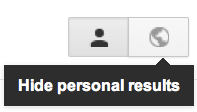
To see general results on a specific search, after the search just click the globe near the upper right corner of the search results page. The will hide personal results.
2012-01-14-results.png

Click the globe to temporarily disable personalized search for this one search. The person icon restores personalized search

Turn off personal search for all searches

To turn off personal search for all searches:

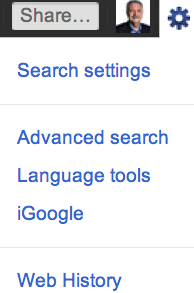
1. Go to Google search and click on the gear icon in the upper right corner and click "Search settings." You need to be signed-in to your Google account to make any changes.
2012-01-14-settings.png

Click on the gear in upper right corner to change search settings

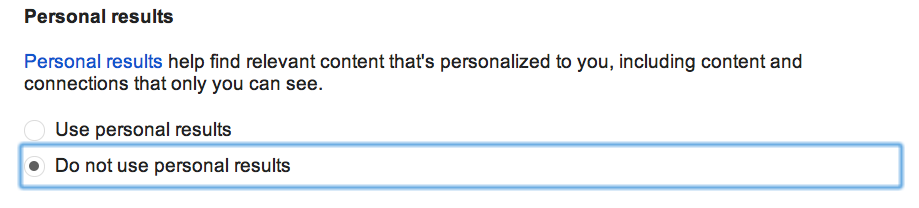
2. Scroll down to the section marked "Personal results" and click on "Do not use personal results."
2012-01-14-ScreenShot20120113at7.04.57PM.png

3. Scroll to the bottom of the page and click Save.

Another option is to do your search using the private browsing or "incognito" option of your browser. When using that option, you are not logged into Google and none of your usual preferences are in effect. Also, there is no record of any searches or activity stored on your machine or sent to Google. Another option is to log out of your Google account.

Disclosure: Larry Magid is co-director of ConnectSafely.org, which receives financial support from Google and Facebook.

This article also appears on Forbes.com.


Follow Larry Magid on Twitter: www.twitter.com/larrymagid

Scroll down for step-by-step instructions to turn off personal search Earlier this week Google announced that search is going "social," so that what you find when you do a Google search will be infl...
 
 
  • Comments
  • 25
  • Pending Comments
  • 0
  • View FAQ
Comments are closed for this entry
View All
Favorites
Recency  | 
Popularity
Page: 1 2  Next ›  Last »  (2 total)
11:49 AM on 02/28/2012
Oh great. I do a lot of searching for all kinds of things related to crime and drugs and street terms for my deposition transcripts that I really hope wouldn't show up on my friends' pages as things I liked! lol
This user has chosen to opt out of the Badges program
photo
04:15 AM on 01/18/2012
One would actually have to use and have friends that use Google+.
So far it's not an issue.
04:41 PM on 02/02/2012
Actually this isn't true. I don't use Google+, but Google is showing me "personalized" results. Google has scrapped my gmail data, so that if I've ever emailed anyone, then their "liked" pages are being displayed in my searches. Very annoying!
This user has chosen to opt out of the Badges program
photo
05:02 PM on 02/02/2012
I use an adblocker so I wouldn't know about that.
11:56 AM on 01/16/2012
My gear icon shows Search Settings, but therein does not lie Personalized Search options. I hope this will slowly roll out to all users - are my instincts right?
08:44 AM on 01/16/2012
So that's why I can't seem to find anything searching Google anymore?
05:55 AM on 01/16/2012
My gear icon doesn't show Search Settings.
photo
HUFFPOST SUPER USER
Charles Queen
I am a disabled nam vet
11:26 PM on 01/15/2012
Personally,I like the new "search plus you'r world"however if anyone doesn't care baout or for it they can easily disable it
11:48 AM on 01/15/2012
Where did my comment go? I just posted it, and there was nothing wrong with it. I did criticize this article, and the premise behind it, but certainly that isn't reason enough to have a comment removed...
12:23 PM on 01/15/2012
Disregard this comment. Clearly it was written in haste.
11:14 AM on 01/15/2012
Really this over reaction is unwarranted. It quite easy to switch between personal and global search options, and it is giving you nothing that isn't already freely available to you. If you aren't signed in to Google, you will only get what is already publicly available. If you are signed in to Google, and even more if you are a + user, you will only get results that are specifically shared with you, in addition to the already public and freely available content. It is quite obvious what is, and what is not, a part of the social search, and quite obvious how to switch it to a global search. Want an opinion different from yours, or your friends? Than hit the global button. BAM! Instantly you get the normal, objective, global search.

Really... It isn't a big deal.

And as far as other social networks being given the same pride of place as Google+ goes, well if they would allow Google to index their networks, than Google would have something to add to the social option. But since they refuse, Google has nothing to give people.

There is absolutely no reason to be freaking out about this, at all.
This user has chosen to opt out of the Badges program
photo
04:18 AM on 01/18/2012
Not to mention all the info I gave Google about me is fake.
On both accounts.
Same for Yahoo (great for junk email).
They both keep asking for my cell phone number.
Next time I'll just give them a fake one as well.
02:23 PM on 01/19/2012
My question is what happens when they finally call my cell phone number about something and reach a fortune telling hotline. Are they going to rack up some serious charges? ;)
10:05 PM on 01/14/2012
thank you!!!
This user has chosen to opt out of the Badges program
photo
CB5
2012 will either make us or break us. VOTE
07:20 PM on 01/14/2012
Thanks for the heads up ! Good info ~
06:57 PM on 01/14/2012
Google has to a large degree, jumped the shark.
06:56 PM on 01/14/2012
I'll just switch to Bing.
05:43 PM on 01/14/2012
"You need to be signed-in to your Google account to make any changes"

therein lies the rub.

a fellow huffposter turned me onto ixquick.com - pulls results from 10 engines, completely anon and no logging of ip.
05:34 PM on 01/14/2012
What happens when big changes occur - like divorce or change of significant other? What about stalkers, like old boyfriends getting wind that she's meeting Mr.Right at a new hot spot? It's crazy to share so much information that can determine preferences, choices, and other matters, all for the benefit of some snooper hired by a consulting firm that is in turn hired by who knows who. There will always be people who have rapture over the illusion of celebrity - but should that set the stage for everyone?
photo
HUFFPOST SUPER USER
Praedor
04:38 PM on 01/14/2012
Best option: don't use Google+, Facebook, or other crap that is nothing but a honeypot for privacy violations.