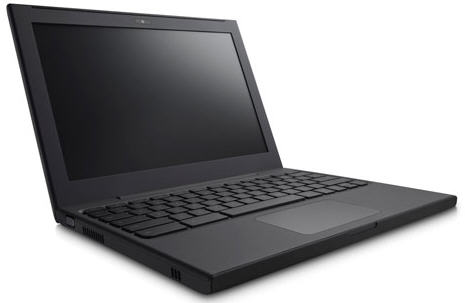
Google's Cr-48 Chrome Notebook is for testing purposes only (Photo credit: Google)
In my long career as a technology journalist, I've reviewed many computers and, typically, when I review a new machine, I give myself at least a full day to set it up, install all my software and put it through its paces. It takes even longer if I'm using a machine with an operating system that I've never used before.
But I didn't need anything close to a full day to configure and evaluate the Cr-48 running Google's brand new Chrome operating system. After taking it out of the box, it took me less than three minutes to have the machine running and fully configured. That's because, unlike traditional operating systems, the Chrome OS is Web-based, and since I already have a Google account and have used Google's Chrome browser on my PC, there was almost nothing to configure.
The "out of box" experience consists of the following steps:
1. Open the box and take the machine out
2. Insert the battery
3. Open the lid and wait maybe 1 or 2 seconds
4. Select your language (i.e. English) and your WiFi network
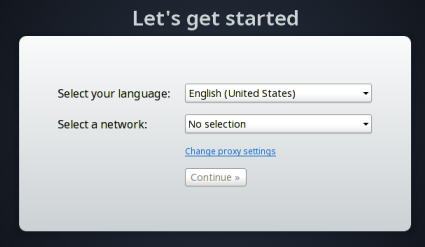
5. Type in your Google account name (typically Gmail address) and password
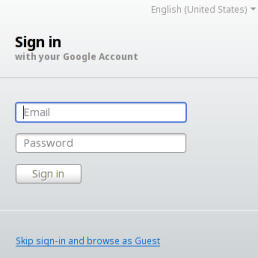
6. Start using the web or Chrome apps
Experience the Same as Using Chrome on a PC or Mac

Because I use Chrome on my Windows machine and have already synced it to my Google account, there was nothing else to do. All of my bookmarks were there and even the Chrome extensions I use on my PC (Xmarks and Lastpass) were already installed and configured. From then on, my experience using the Chrome OS was nearly the same as my experience using it on my PC, so if you want to check out the user interface for the Chrome OS, just download the Chrome browser and you're all set.
Chrome Apps
This column was written on the new machine using the Google Docs and Spreadsheets web app which has been available from Google that's been available on the Web for quite some time.

Whether you have the Chrome OS or are just using Chrome on your PC or Mac, there is now a Chrome Web Store where you can find lots of free or paid applications that work within the browser regardless of whether you're using it on the Chrome laptop or a PC. There includes games, productivity products, news applications (for New York Times and The Huffington Post, among others) and utility programs. I downloaded the Picnik Photo Editor, which enabled me to use the Chrome laptop to edit photos stored in my Picasa web album. It worked well, but I can't figure out if it's possible to transfer a photo from a digital camera to the device. Cell phone photos, of course, can be transferred via email or the Web.
Hardware and Bootup
I'm not going to spend a lot of time describing the hardware because the machine Google sent me (called the Cr-48) will never be available to the general public. Google commissioned an estimated 60,000 of these laptops which look a lot like the old black Macbooks. It has an excellent keyboard and oversized track pad which, like the Mac, is one giant button. You tap with two fingers to "right click" and drag two fingers to scroll up or down.
From a power-off cold start it takes 15 seconds for the machine to boot up. If you shut the lid, it goes into a sleep mode and wakes up less than a second after you raise the lid. Google says you get eight hours on a single charge and eight days in standby mode. I didn't test out the battery life but it does seem to be running for a long time since I last charged it.
The device has both WiFi and 3G networking. The 3G, at least on the test machine, works only on the Verizon network. Verizon is offering 100 megabytes of free data per month and a number of other plans starting at $9.99 a day for unlimited use. That free 100 MB may seem like a generous offer but if you use it for more than a couple of hours, you're likely to speed through it.
Good Keyboard but No Accessible Storage and Sluggish Performance
Both the keyboard and trackpad on the Google reference machine are excellent. I don't know what the production machines will look like but, as a touch typist, I'm glad to have a full-sized keyboard on my test machine. What is odd, however, is that there is no caps lock key. Instead there's a search key which, great surprise, lets you quickly execute a Google search.
The Chrome notebook seemed a bit sluggish to me so I compared it to my Lenovo X300 notebook that runs Windows 7 but has a far more powerful Intel processor. While the Chrome device boots and comes out of sleep mode a lot faster, the Lenovo is noticeably faster loading web pages even though both machines are connected to the same WiFi network.
Apply to Get Your Own Cr-48
Google is making these machines available to reviewers and selected people from companies, non-profits, and government agencies along with some consumers who can apply for the pilot program
Bottom Line
While I'm pleased to see an alternative to Mac and Windows notebooks and agree that many users will probably be happy with a device that can just access the Web and Web apps, I'm not convinced that the Chrome OS will take the world by storm. Unlike my first experiences with the Apple iPad, I'm not even close to falling in love with this new device. It's useful, but it's not fun and it's not able to run many of the applications I depend on. Over time, there will be Web Apps to replace most of the Windows and Mac apps that many of us use, but I'm not sure that a web browser is necessarily the best place to run those apps. Still, hats off to Google for putting effort into this and making thousands of machines available for testing. Also, it's important to point out that the Chrome OS is still in testing mode. I'm hoping that the commercially available machines from Samsung and Acer will be faster and that the operating system and Chrome browser will be a bit more mature when they finally ship mid-2011.